All articles/How-to
How to Keep the Same Character Across AI Scenes
One character, many scenes, the same face. The anchor-picture method, what each tile changes, how to keep or switch her visual style, and what to fix first.
I uploaded our blonde test character's picture and tapped Prone Bone, Fully Nude and Snowed-In Cabin. Face and hair from the file, outfit and place from the tiles.
What we picked
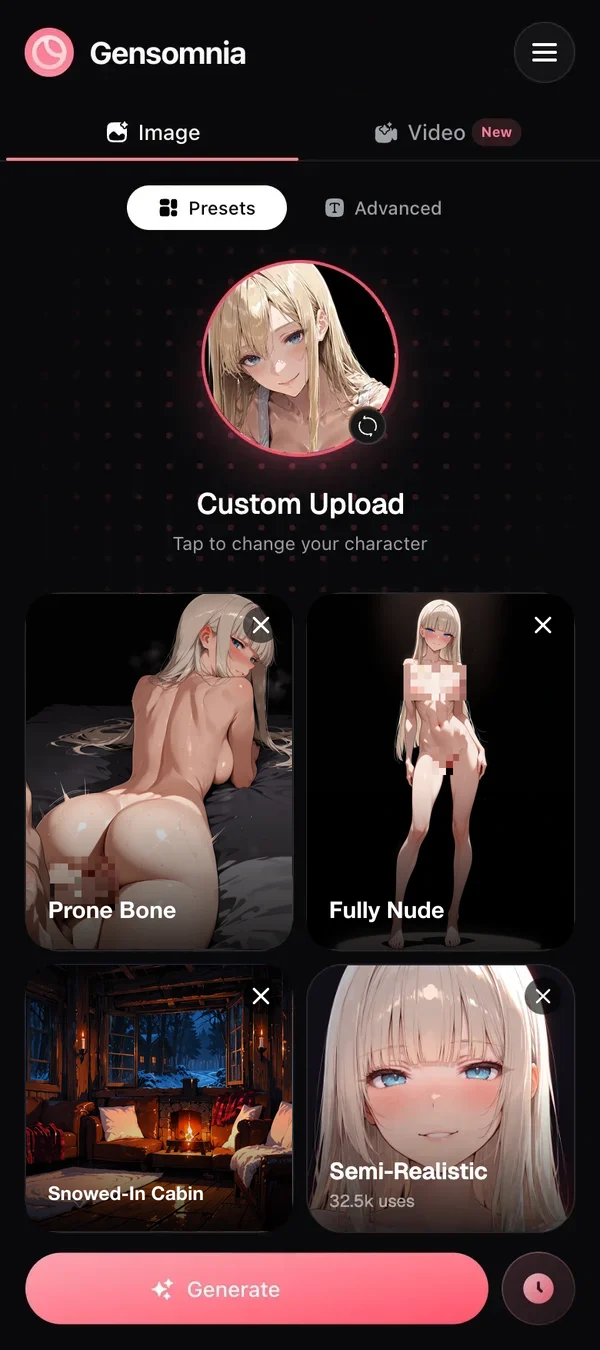
The result
 Pixelated for this page
Prone Bone, Fully Nude, Snowed-In Cabin, Semi-Realistic: the uploaded blonde face down with a partner by a frosted window. Pixelated here, uncensored in the app.
Same girl, ten scenes, and by scene three she's somebody's cousin. Why does that keep happening, and how do you stop it?
Short version: keep one anchor picture of her and start every scene from it, changing one thing per run. Gensomnia is built for exactly this: it keeps her face, hair, outfit, background and visual style, and changes only what you pick.
A prompt describes a type. A picture holds a face.
Why her face changes between images
A text description fits many different women, so the generator picks a new one each time. "Blonde, bangs, blue eyes" describes thousands of faces. Each run picks a different one. Not a bug, honestly. That's what a description is. The more you add to the scene (a partner, steam, low light), the more the model spends on the scene and the less on her.
The anchor-picture method
The anchor-picture method has three rules, and none of them is clever:
- One anchor. Pick the single picture that is her. Every scene starts from it.
- One change per run. New pose, or new outfit, or new place. Not all three.
- Promote keepers. When a frame comes out exactly right, it can become the next anchor for a run of scenes in that outfit.
Rule two is the one people skip. Then something looks off and they can't tell which of their three changes did it (spoiler: usually all three).
Takeaway: boring method, steady face.
What each tile changes
In Gensomnia you set a scene with four kinds of tiles, and only the pose is required. Whatever you leave empty comes from her picture.
That table is the whole trick for a consistent set. Want her in the same dress across ten poses? Never touch the clothes tile.
Step by step
- 01
Choose the anchor
Use a clear picture: face large in the frame, even light, no hand or hair across it. A drawing, a realistic frame of a fictional woman or one of your past keepers all work. No real people, nobody under 18.
- 02
Upload it once
It stays in your character picker afterwards, so the next session starts with her already there.
- 03
Tap a pose and generate
That's the minimum. You get a generation in 10–15 seconds with her face, hair, outfit, room and style.
- 04
Change one thing
Then tap a new place, or a new outfit, or Fully Nude. One per run. There are 200+ outfits and 200+ places, and new ones are added daily, so you won't run short.
- 05
Keep the winners
Save the good frames to favorites. A strong one can be the anchor for the next batch.
Keep her visual style, or change it
Her visual style stays with the anchor unless you change it. Upload a comic-style drawing and you get comic-style frames, which matters more than people expect: if the face matches but the style changes from frame to frame, the set doesn't look like one set.
When you do want a change, set semi-realistic, 3D, anime, cartoon or comics on top. It's a real new look, with the same woman underneath. I'd use it for a deliberate break, like a flashback chapter, and leave it alone otherwise. I have a piece on doing this with your own anime waifu, where keeping the drawn look matters most.
Video with the same face
Video follows the same rule. A 5-second 720p clip can start from a frame you already like, so the face in motion is the face you approved.
What to fix if her face still changes
Look at the anchor before you blame anything else. Real talk, it's the anchor nine times out of ten:
- Face too small or in shadow. Crop tighter, or pick a brighter picture.
- Something covering her face. Hair, a hand, sunglasses. The generator fills in the gap with a guess.
- You changed several things at once. Go back one step.
- The pose turns her away. Some poses hide the face by nature. Try a batch of 4 and keep the best.
If you only have one picture of her, start with how to make NSFW AI pictures from one image. If you're still choosing the tool, there's a ranking of generators that take your picture, and I wrote about using this method for a whole game. My Gensomnia review covers the rest of the app.
Bottom line: the cabin frame above is the test I now run on any new tool. If her face comes out the same, the tool stays. If not, I'm out.
One anchor picture. Change one thing at a time, and she stays herself.
GenerateQuestions
- Q01How do I keep the same character across different AI scenes?
- Start every scene from one reference picture of her and change one thing per run. A picture pins down a specific face; a written description only narrows the type.
- Q02Why does my character's face change between images?
- Because a text prompt describes a kind of woman, and the generator picks a new one that fits each time. The busier the scene, the further she drifts.
- Q03What makes a good anchor picture?
- Her face large, evenly lit and unobstructed, in the visual style you want for the whole set. A past frame you like works, as long as she is fictional and an adult.
- Q04Can I keep her outfit and room from the picture?
- Yes, in Gensomnia. Only the pose is required. Leave the clothes and place tiles empty and they stay as they are in the uploaded picture.
- Q05Can the same character appear in nude scenes?
- Yes. In Gensomnia, Fully Nude is a clothes tile, and her face, hair and visual style stay the same. Real people and anyone under 18 are not allowed.
- Q06Can I change her visual style and keep her face?
- Yes. Gensomnia keeps the style of your picture by default, and you can switch her to semi-realistic, anime, cartoon or comics when you want a new look.
Some links on this site pay us a commission when you sign up. The ranking is based on our checks, and commissions don't change it.
Keep reading
 Gensomnia Generate