All articles/Reviews
Gensomnia Review: NSFW AI Image and Video Generator
Gensomnia review: an NSFW AI generator for images and video. What the photo upload keeps, tiles or your own prompt, nude scenes, and what it lacks.
I uploaded our blonde test character's picture, tapped Shy Covering, Fully Nude and Modern Bathroom, and left the style on Semi-Realistic.
What we picked
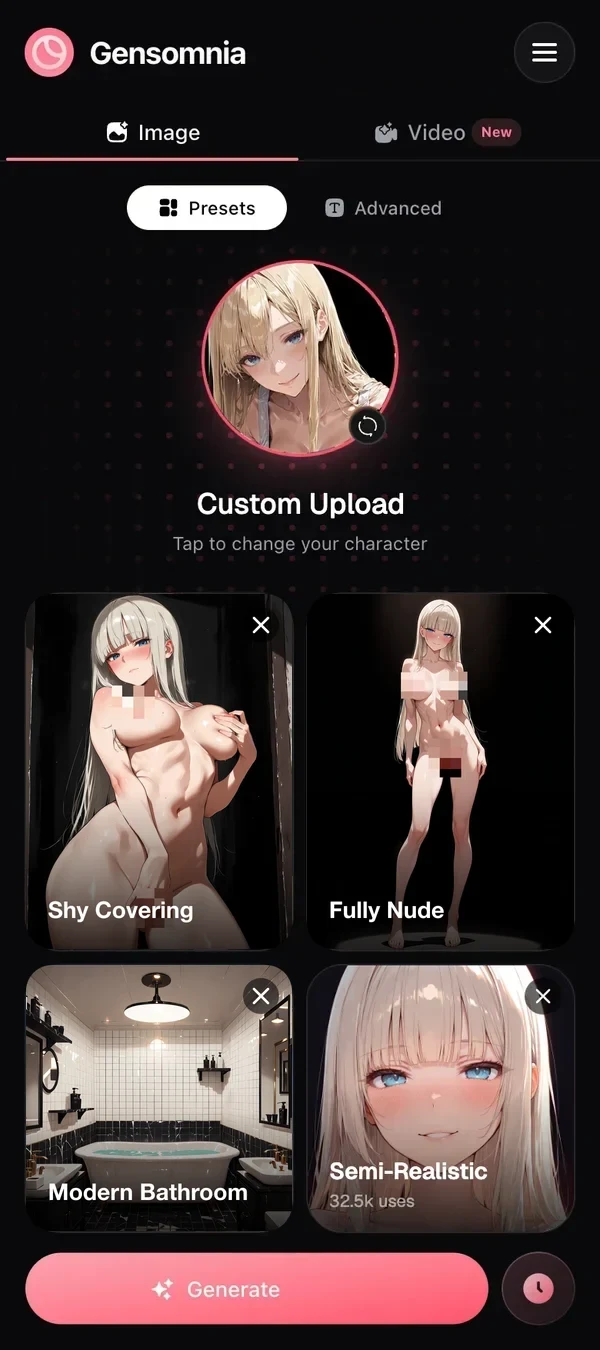
The result
 Pixelated for this page
Modern Bathroom, Fully Nude, Shy Covering, Semi-Realistic. Our uploaded blonde, pink-cheeked, an arm over her chest against white marble. We pixelated her for the site; the app does not.
This site ranks Gensomnia first. So does it hold up when you actually upload a picture and start tapping, or is that just affiliate talk?
Short version: nude scenes are allowed, you upload your own reference, and her face, hair, outfit, background and visual style stay. Only what you pick changes. Pictures and video, no chat.
Seduced wins on video length. Gensomnia wins when you bring your own picture.
Real talk first: we earn a commission when people sign up through our links. Keep that in mind. I've stuck to things you can check yourself.
What I tested
I tested Gensomnia in a phone browser: the character picker, the upload, the pose, clothes, place and style pickers, and the text prompt. The picture above is one full run with our test character. I didn't score image quality against other services, so there's no made-up 9.4 out of 10 here (you've seen enough of those).
Why Gensomnia is our No. 1
There are four reasons, most important first.
Nude scenes are allowed. Fully Nude is in the clothes row next to Lingerie and Towel, and it's one tap like the others. You don't need special wording to get past a filter, and the result isn't blurred. Poses with a partner are in the same catalog as solo ones.
You start from your own photo or reference. Upload a fictional adult, drawn or realistic. Whatever pose, outfit or place you pick next, she comes back with her face and hair. You don't have to describe her again in every prompt.
The style of your picture is kept. Ink lines stay ink lines. Comic art stays comic art. A realistic picture keeps its skin and lighting. Most tools only talk about keeping the face, but the style matters just as much if you want a set of pictures to look like one set.
Or you can change the style. Pick semi-realistic, 3D, anime, cartoon or comics, and you get a new look with the same character. Useful if you want one scene in a different style.
Takeaway: the upload is the whole point, and it works.
Do you need to write prompts?
No, but you can. Honestly, this is the part that surprised me. Gensomnia needs only one thing from you: a pose, or a prompt instead of one. Clothes, place and style are optional, and anything you skip comes from her picture. That's what you want when the outfit in the picture is the outfit you need.
The catalog has 300+ ready characters, 75+ poses, 200+ outfits and 200+ places, with new ones added daily. If you prefer typing, there's a 1000-character prompt and a 500-character negative prompt. You can make 1, 2, 4 or 8 pictures at once, in five aspect ratios. A generation takes 10–15 seconds.
There's nothing to install. It worked fine on my phone, which is more than I can say for a ComfyUI setup. Characters you upload are saved next to the ready ones, so next time she's already there. Favorites and a one-tap repeat button cover the rest.
Is it good for professional work?
Yes, if you make adult game art, visual novels, comics, book covers or a Patreon series. The hard part there is keeping one character the same across fifty frames, and that's what the upload does: her face, hair and visual style stay in every scene. Switch the style and the whole series moves to it. Write the prompt yourself when tiles aren't precise enough, pick the aspect ratio your page or game screen needs, and get eight versions per run. No nodes, checkpoints or samplers to manage.
Can Gensomnia make videos?
Yes. A video is 5 seconds at 720p. You can start from a picture you made, a preset or her uploaded picture. The same five styles work for video. I use it to animate a picture I liked.
Not gonna lie, 5 seconds is short. Seduced runs videos up to 18 seconds, and OurDream does 60-second scenes. If long clips are what you're after, those two win.
Where Gensomnia stalls
- No chat. On purpose: it's pictures and video only, and a chat isn't coming. Want a girlfriend to talk to? Wrong app.
- Short video. 5 seconds at 720p, as above.
- Poses: 75+, new ones daily. OurDream lists 100+, so it's ahead on that one list.
Is it private?
Yes. Nothing is public by default. You can share to Explore one picture at a time, only if you choose to, and your history stays until you delete it. The two rules are the usual ones: no real people, nobody under 18.
Gensomnia vs Seduced and Imagine Red
Here it is next to the two services I'd try next. A plus marks where only one tool does something.
- Source
- Imagine Red home page
- checked on
- Nov 7, 2026
Quote“Create NSFW AI images from text or reference images.”
Imagine Red is a good alternative if you like working from text; our Imagine Red review has more. Seduced is better for longer explicit videos; here's that review. The full order is in our ranking of generators that take your picture, and if you want one face across a whole set, here's how I do it.
Bottom line: I came in suspicious of a tool my own site ranks first. Then my character landed in a new scene and still looked like herself. I'm keeping it at No. 1.
Upload your photo or reference, tap a pose and generate.
GenerateQuestions
- Q01What does Gensomnia do?
- It's an NSFW AI generator for pictures and short videos. Choose one of 300+ ready characters or upload your own, then pick pose, outfit and place with taps, or type a prompt.
- Q02Can Gensomnia keep my own reference the same?
- Yes. Upload a picture of a fictional adult and she keeps her face, hair, outfit, background and visual style. Only what you pick changes, such as the pose, outfit or place.
- Q03Are nude scenes allowed on Gensomnia?
- Yes. Tap Fully Nude in the clothes row. The rules: no real people, no one under 18.
- Q04Do I have to pick every tile?
- No. Only a pose is required, and a typed prompt can replace it. Anything you skip comes from her uploaded picture.
- Q05How fast is one generation?
- 10 to 15 seconds. A video is 5 seconds at 720p.
- Q06Does Gensomnia have a chat companion?
- No, and none is planned. It only makes pictures and videos.
Some links on this site pay us a commission when you sign up. The ranking is based on our checks, and commissions don't change it.
Keep reading
 Gensomnia Generate